Main-Karaoke-Media-Library
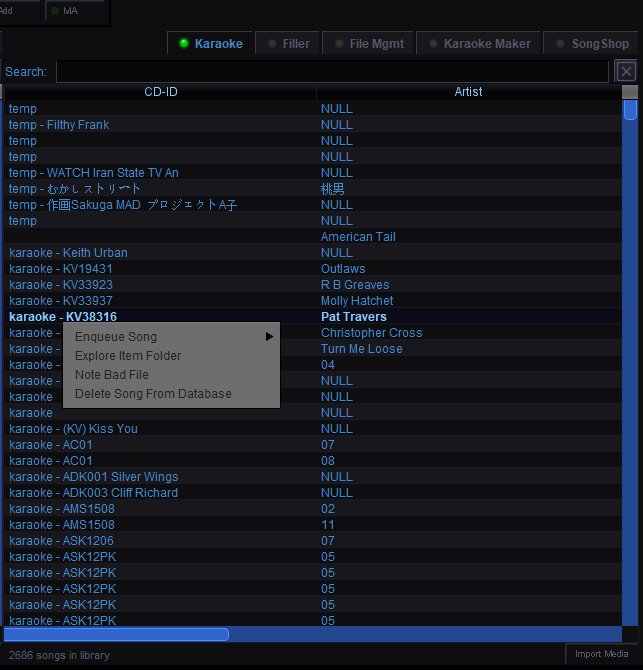
Karaoke Media Library
The Karaoke tab in the Song Browser is your main song library. It lists every karaoke track QUP has found in your media folders (configured in the Media settings panel). This is where you and your singers find songs to queue.
Library Columns
CD-ID — The disc and track identifier parsed from the filename. The format depends on your Song Name Formatting setting in the Database configuration panel. Entries are sorted alphabetically by CD-ID by default.
Artist — The artist name parsed from the filename. Tracks that could not be parsed show "NULL" in this column — this usually means the filename does not match your selected naming format.
Searching
Type in the search bar to filter the library by CD-ID or artist name. The list filters in real-time as you type. Click the X button to clear the search and show the full library.
Queuing Songs
Double-click any song to open the Singer Entry dialog where you can assign it to a new or existing singer with optional pitch and tempo adjustments.
Right-click a song for the context menu:
Enqueue Song — Hover to see a submenu of all singers currently in the rotation. Click a name to instantly queue the song for that singer. Select "More options..." for the full Singer Entry dialog.
Explore Item Folder — Opens the folder on your computer where the song file is stored. Useful for checking file quality or managing duplicates.
Note Bad File — Flags the song as a bad or corrupt file for later review. Use this when you discover a track that skips, has audio issues, or is mislabeled.
Delete Song From Database — Removes the song from QUP's media database. The actual file on your computer is not deleted — only the database entry is removed. The song will reappear if you rescan the media folder.
Song Browser Tabs
The other tabs across the top of the Song Browser provide access to different media sources:
Filler — Browse and manage your filler music library.
File Mgmt — File management tools for organizing your media library.
Karaoke Maker — Create AI-generated karaoke tracks from regular songs.
SongShop — Browse and purchase tracks from the Party Tyme karaoke library.
Bottom Bar
Songs in library — Shows the total number of karaoke tracks in your database.
Import Media — Import media files directly into QUP's library.