Main-SongShop
SongShop
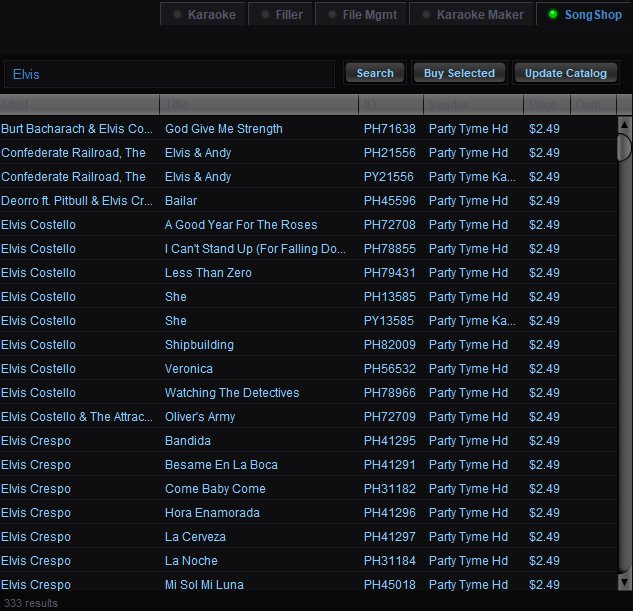 The SongShop tab in the Song Browser connects to the Party Tyme karaoke library, letting you search, browse, and purchase individual karaoke tracks on demand. If a singer requests a song you don't have, you can buy it mid-show and have it ready to queue in seconds.
You must have a Party Tyme account configured in the SongShop configuration panel before using this tab.
Searching
Type an artist name, song title, or keyword into the search field and click Search. Results are displayed in the table below. The result count is shown at the bottom left (e.g. "333 results").
Results Columns
Artist — The performing artist.
Title — The song title.
ID — The Party Tyme catalog ID for the track.
Vendor — The content provider (e.g. Party Tyme Hd, Party Tyme Karaoke).
Price — The per-track purchase price (typically $2.49).
Own — Indicates whether you already own this track. If you've previously purchased a song, it shows here so you don't accidentally buy it again.
Purchasing
Select one or more tracks from the results — use Click to select a single track, Shift+Click for a range, or Ctrl+Click for individual picks. Then click Buy Selected to purchase them. The tracks are downloaded immediately and added to your QUP karaoke library, ready to queue for singers.
If you have a credit card saved in the SongShop configuration panel, purchases are one-click. Otherwise you'll be prompted for payment details.
Update Catalog
Click Update Catalog to refresh the local copy of the Party Tyme song