Main-Filler-Playlist
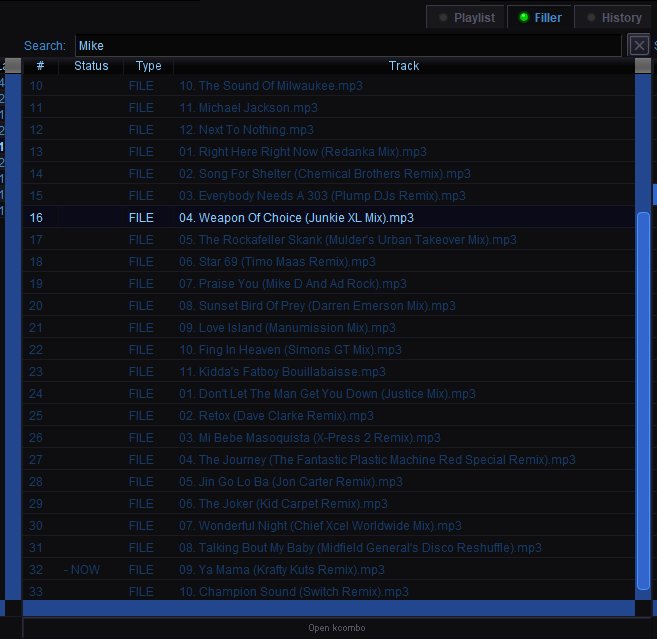
Filler Playlist
The Filler tab (next to Playlist and History) shows the queue of background music tracks that play between karaoke performances. Filler keeps the room from going silent while singers rotate.
Where Filler Tracks Come From
Filler music is sourced from any media folder marked with the Filler checkbox in the Media configuration panel. When QUP starts, it loads tracks from those folders and shuffles them into the filler playlist. Only folders flagged as filler are used — your regular karaoke library is not mixed in.
Filler Playlist Columns
# — The position in the filler queue.
Status — Shows "- NOW" for the currently playing filler track.
Type — The source type of the track (e.g. FILE for local files).
Track — The filename of the filler track.
How Filler Playback Works
Filler plays automatically between karaoke songs when the crossfader is set to No Karaoke mode. When a karaoke song ends, the crossfader fades over to the filler channel, and the next filler track plays. When the next karaoke song starts, the crossfader fades back. In Manual mode, the host controls when filler is heard using the crossfader slider. In Silence mode, filler does not play.
The filler channel has its own independent transport controls, volume, balance, and EQ — so you can adjust filler audio separately from karaoke without affecting the main channel.
Search
The search bar at the top lets you filter the filler playlist by track name. Click the X button to clear the search.