Main-Crossfader
Crossfader
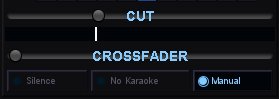
The crossfader sits between the Karaoke and Filler channels and controls how audio transitions between karaoke performances and background music.
Crossfade Slider
The dual-slider crossfader blends between the karaoke channel (left) and the filler channel (right). Drag it left to bring up filler music, drag it right to bring up karaoke audio. When a karaoke song starts or ends, the crossfader moves automatically based on the selected mode — or you can grab it and position it yourself in Manual mode.
CUT Slider
The CUT slider is used in conjunction with silence mode, to set the silence level before automatic crossfading. There is a 5 second window of crossfading at the start and end of every song so it doesn't trigger in the middle of a song during music breaks.
Crossfade Modes
The three buttons below the slider select how the crossfader behaves automatically:
Silence — When a karaoke song ends, the crossfader automatically fades over to filler music. When the next karaoke song starts, it fades back. This is the most common mode for live shows — it keeps the room filled with music between performances so there are no awkward silences. The fade timing is set in the Media configuration panel.
No Karaoke — In this mode, the crossfader only activates when there is no more karaoke in the playlist.
Manual — The crossfader does not move automatically. You control it entirely by hand. Use this when you want full control over transitions — for example, if you like to talk over filler music before bringing in the next singer, or if you want to blend karaoke and filler audio at the same time for a specific effect.