Settings-Simulation
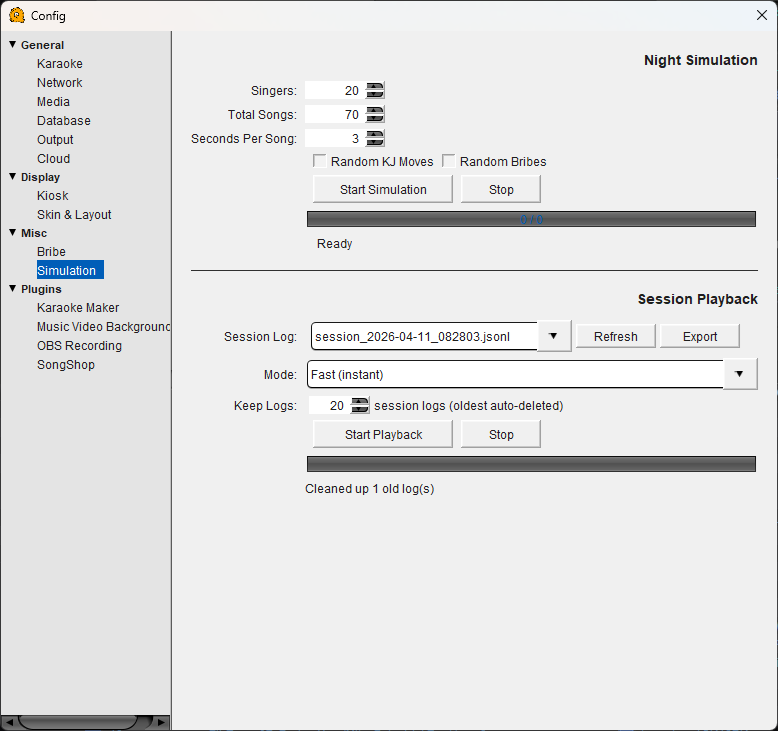
Simulation Configuration
Night Simulation
Simulates an entire karaoke night without real singers or music. Useful for testing your rotation settings, bribe rules, and queue behavior before a live show. Recommend viewing on the kcombo page.
Singers — The number of simulated singers to create. Default is 20.
Total Songs — The total number of songs that will be queued across all simulated singers during the run.
Seconds Per Song — How many seconds each simulated song "plays" before advancing to the next. Keep this low (e.g. 3 seconds) for fast testing.
Random KJ Moves — When enabled, the simulation randomly performs host actions like rearranging singers or moving songs, mimicking real-world KJ adjustments during a show.
Random Bribes — When enabled, simulated singers will randomly bribe to move up in the rotation. Use this alongside the Bribe configuration to verify your pricing rules feel right over a full night.
Start Simulation / Stop — Begins or halts the simulation. The progress bar shows how far through the simulated night you are.
Session Playback
Replays a recorded session log from a real or simulated night. This lets you review exactly what happened — every song queued, every rotation decision, every bribe — and spot any issues after the fact.
Session Log — Select a previously recorded session log file from the dropdown.
Refresh — Reloads the list of available session log files.
Export — Exports the selected session log for sharing or archiving.
Mode — Controls playback speed. "Fast (instant)" replays the entire session as quickly as possible. Other modes may replay at real-time or adjusted speeds.
Keep Logs — The number of session log files to keep on disk. When the limit is reached, the oldest logs are automatically deleted. Default is 20.
Start Playback / Stop — Begins or halts session playback.