Settings-Lyrics
Lyrics
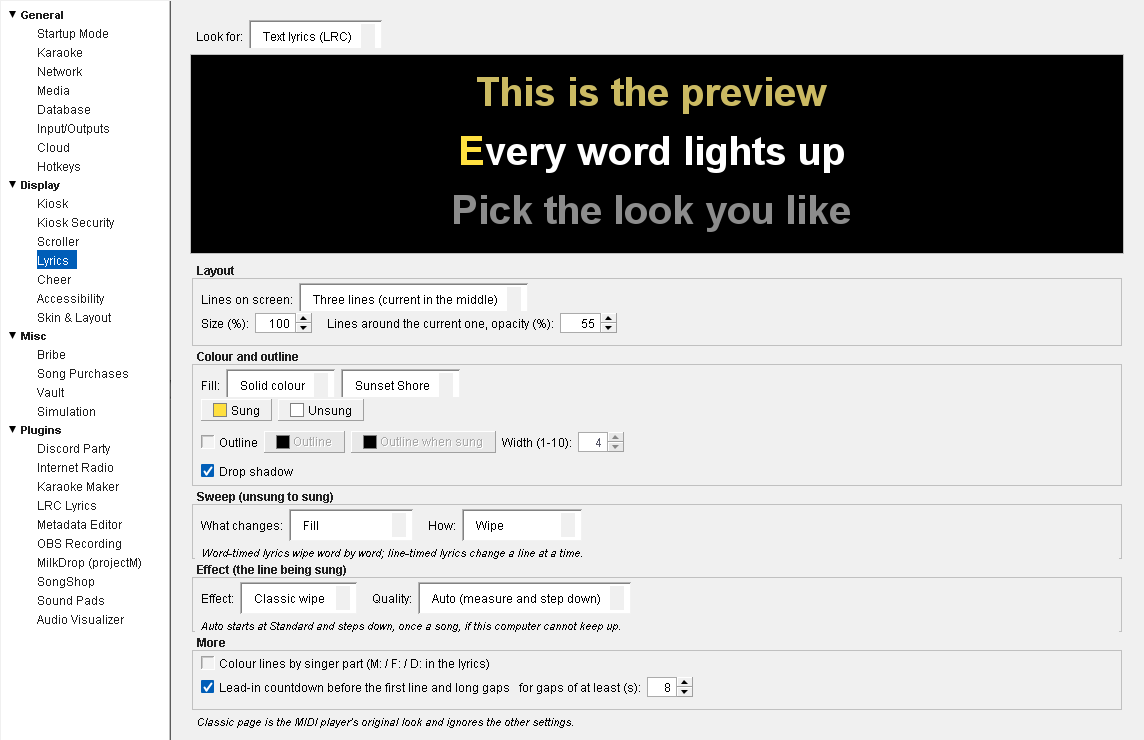
Open Preferences (Ctrl+P) and choose Display → Lyrics. This page sets how lyric text looks on the singer screen: songs with LRC lyrics, and MIDI (.mid / .kar) songs. CDG songs carry their lyrics as pictures, so this page doesn't change them.
Look for — Which look you're editing. Text lyrics (LRC) and MIDI files each keep their own. Text lyrics start on Three lines; MIDI starts on Classic page, the MIDI player's original look.
Text lyrics start with amber sung words, white unsung ones, a drop shadow, a wipe, and the lead-in countdown on.
The black strip under it is a live preview: three demo lines that light up word by word on a loop, so you can pick by eye. Changes show at once, on the preview and on the singer screen, and are saved when you close Preferences.
Layout
Lines on screen — Three lines (current in the middle), Two lines, Single line, Page, or Classic page (MIDI's look). Classic page ignores every other setting on this page, so they're greyed out while it's chosen.
Size (%) — 50 to 200 % of the normal text size.
Lines around the current one, opacity (%) — How bright the lines before and after the one being sung are, from 10 to 100 %. Lower makes the current line stand out.
Colour and outline
Fill — Solid colour, or Gradient with a gradient chosen from the list. The gradients are the same ones the Scroller uses, including any you imported there.
Sung / Unsung — The colours of words already sung and words still to come. Click either to pick a colour; the swatch on the button shows the current one.
Outline — Draws an outline round the letters. Pick its colour before and after the word is sung (Outline, Outline when sung) and its Width (1-10).
Drop shadow — A shadow under the text, to keep it readable over a busy video.
Sweep (unsung to sung)
What changes — Fill, Outline, or Fill and outline.
How — Instant, Wipe, Soft wipe or Letter by letter.
Lyrics timed word by word wipe word by word; lyrics timed by the line change a whole line at a time.
Effect (the line being sung)
Effect — A movement for the line being sung: Classic wipe, Pop, Rise, Glow, Bounce, Tilt, Fade through or Stadium.
Quality — Basic, Standard, Full, or Auto (measure and step down). Auto starts at Standard and steps down, once a song, if the computer can't keep up.
More
Colour lines by singer part (M: / F: / D: in the lyrics) — For duet lyrics whose lines are marked M:, F: or D:, the men's lines are blue, the women's pink and the lines sung together purple. Off by default.
Lead-in countdown before the first line and long gaps — Counts the singer in before the first line, and after any gap of at least the number of seconds you set (3 to 60, 8 by default).
Updated on version 2.35.0, October 31, 2026