Settings-Karaoke-Maker
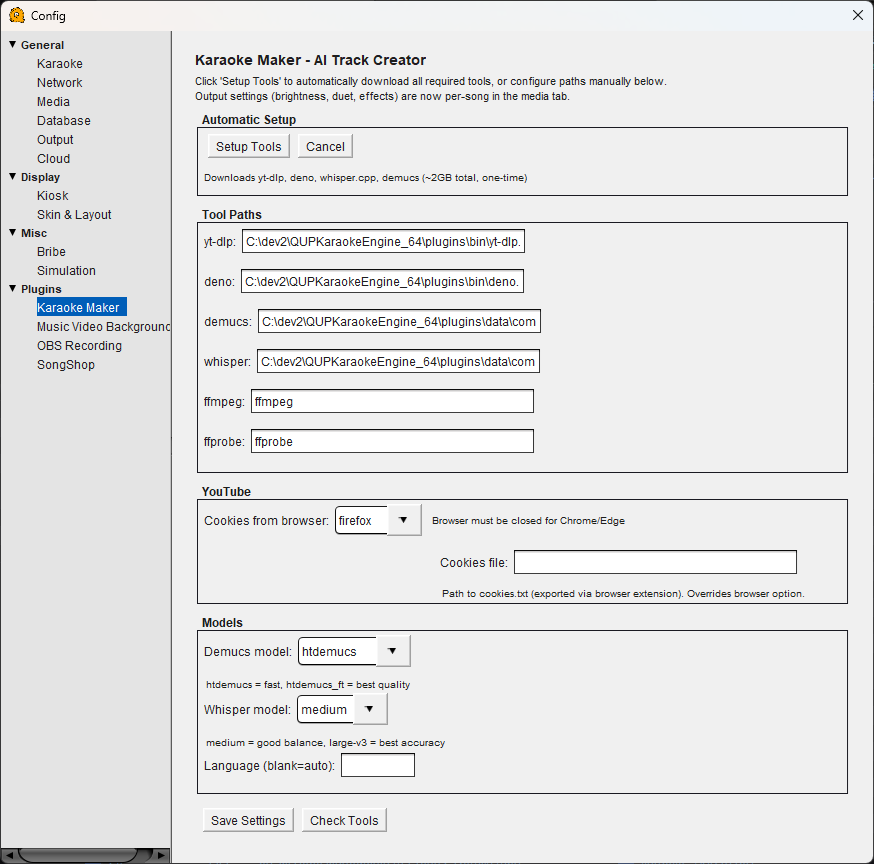 Disclaimer: Users will receive a popup asking if they agree that they have the rights to use the video on first use. Failure to agree keeps the plugin disabled
Karaoke Maker Configuration
Karaoke Maker is an AI-powered tool that creates karaoke tracks from regular songs. It downloads a song from YouTube, separates the vocals from the instrumental using AI, and generates timed lyrics — producing a ready-to-sing karaoke track. Output settings like brightness, duet mode, and effects are configured per-song in the media tab.
Automatic Setup
Setup Tools — Downloads all required tools automatically: yt-dlp, deno, whisper.cpp, and demucs (~2GB total, one-time download). This is the easiest way to get started.
Cancel — Cancels a setup in progress.
Tool Paths
If you prefer to manage tools manually or they are installed elsewhere on your system, you can set the paths here.
yt-dlp — Path to the yt-dlp executable. Used to download audio from YouTube.
deno — Path to the Deno runtime. Used for internal processing scripts.
demucs — Path to the Demucs AI vocal separation model.
whisper — Path to whisper.cpp. Used for automatic speech recognition to generate timed lyrics.
ffmpeg — Path to the FFmpeg executable. Used for audio format conversion and processing.
ffprobe — Path to ffprobe. Used to inspect audio file metadata.
YouTube
Cookies from browser — Select which browser QUP should pull cookies from when downloading from YouTube. This helps avoid age-restricted or region-locked content. Note: Chrome and Edge must be fully closed before QUP can read their cookies.
Cookies file — Alternatively, provide a direct path to a cookies.txt file exported via a browser extension. This overrides the browser option above.
Models
Demucs model — The AI model used for vocal separation. "htdemucs" is fast; "htdemucs_ft" produces the best quality separation but takes longer.
Whisper model — The AI model used for lyrics transcription. "medium" is a good balance of speed and accuracy; "large-v3" provides the best accuracy but requires more processing time and memory.
Language — The language of the song for lyrics transcription. Leave blank for automatic detection. Set a language code (e.g. "en", "es", "ja") if auto-detection struggles with a particular track.
Save Settings — Saves your Karaoke Maker configuration.
Check Tools — Verifies that all required tools are installed and accessible at their configured paths. Run this after setup or after changing any paths to confirm everything is working.