Settings-Database
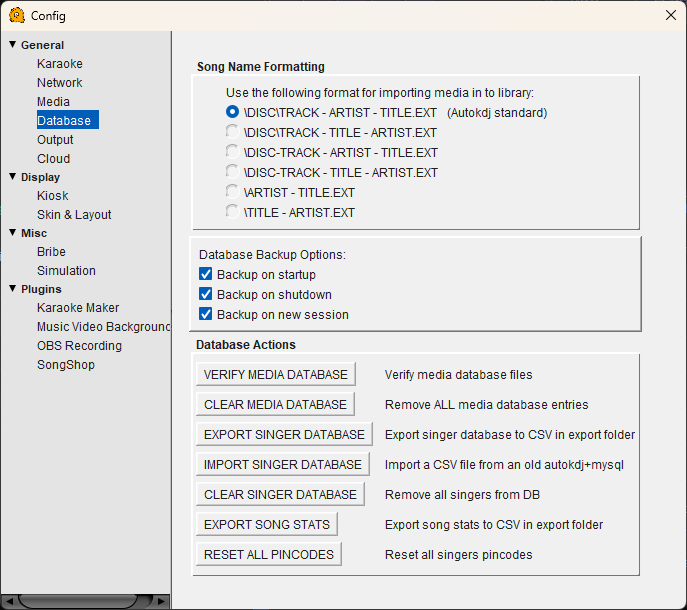
Database Configuration
Song Name Formatting
Tells QUP how to parse your karaoke filenames so it can correctly extract the disc number, track number, artist, and title. Select the format that matches how your files are named. The default is the Autokdj standard.
\DISC\TRACK - ARTIST - TITLE.EXT — Autokdj standard. Files are organized in folders by disc, with the track number, artist, and title separated by dashes in the filename.
\DISC\TRACK - TITLE - ARTIST.EXT — Same folder structure but with title before artist.
\DISC-TRACK - ARTIST - TITLE.EXT — Disc and track are combined in the filename with a dash, no subfolder per disc.
\DISC-TRACK - TITLE - ARTIST.EXT — Same as above but with title before artist.
\ARTIST - TITLE.EXT — Simple format with no disc or track information.
\TITLE - ARTIST.EXT — Simple format with title first.
Choose the format that matches your library before scanning. If you switch formats after scanning, you will need to clear and rescan your media database.
Database Backup Options
Backup on startup — Automatically saves a backup of the database when QUP launches.
Backup on shutdown — Saves a backup when QUP closes.
Backup on new session — Saves a backup whenever a new session is started.
Backups protect your singer database and song statistics. It is recommended to leave all three enabled.
Database Actions
VERIFY MEDIA DATABASE — Checks that every entry in the media database still points to a valid file on disk. Useful for finding broken or missing tracks after moving files around.
CLEAR MEDIA DATABASE — Removes all entries from the media database. Does not delete any actual files. You will need to rescan your media folders after clearing.
EXPORT SINGER DATABASE — Exports your singer database (names, history, preferences) to a CSV file in the export folder.
IMPORT SINGER DATABASE — Imports a singer database from a CSV file. Designed for migrating from an old Autokdj+MySQL setup to QUP.
CLEAR SINGER DATABASE — Removes all singers from the database. This cannot be undone — make sure you export a backup first if you want to keep your singer data.
EXPORT SONG STATS — Exports song play statistics (how many times each track has been played) to a CSV file in the export folder. Useful for tracking your most popular songs.
RESET ALL PINCODES — Clears all singer pin codes. Singers use pin codes to identify themselves on the kiosk — after a reset, everyone will need to set up a new pin on their next visit.