Main-History
History
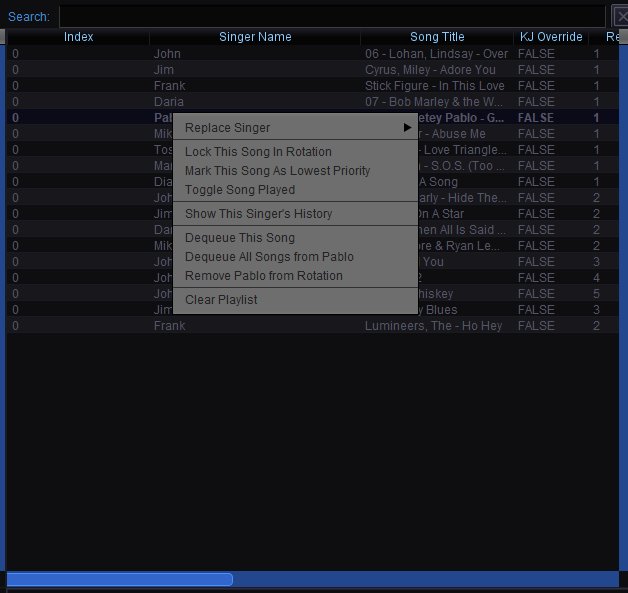
The History tab (next to Playlist and Filler) shows every song that has been played during the current session, in the order they were performed. All entries show an index of 0 since they have already left the active playlist.
History Columns
Index — Always 0 for history entries, indicating the song has already been played.
Singer Name — The singer who performed the song.
Song Title — The track that was played.
KJ Override — Whether the host had manually overridden the rotation placement for this entry.
Round — The rotation round the song was played in.
Uses
History is useful for checking what has already been sung during the night, settling disputes about whether someone already sang, and reviewing the flow of your show. It also serves as a log you can refer back to when using the Session Playback feature in the Simulation panel.
Right-Click Context Menu
Right-clicking a history entry gives the same options as the playlist, allowing you to take action on the singer or re-queue the song:
Replace Singer — Reassign this history entry to a different singer. Useful for correcting records.
Lock This Song In Rotation — Locks the song's position if it is re-queued.
Mark This Song As Lowest Priority — Sets lowest priority if the song is re-queued.
Toggle Song Played — Marks the song as unplayed, effectively moving it back into the active playlist. Useful if a song was accidentally skipped or if a singer wants to redo their performance.
Show This Singer's History — View all songs this singer has performed during the session.
Dequeue This Song — Remove this entry from the history.
Dequeue All Songs from [Singer] — Remove all of this singer's entries from the history.
Remove [Singer] from Rotation — Remove the singer entirely from the rotation.
Clear Playlist — Clears the entire playlist. Does not clear the history.