Settings-Network
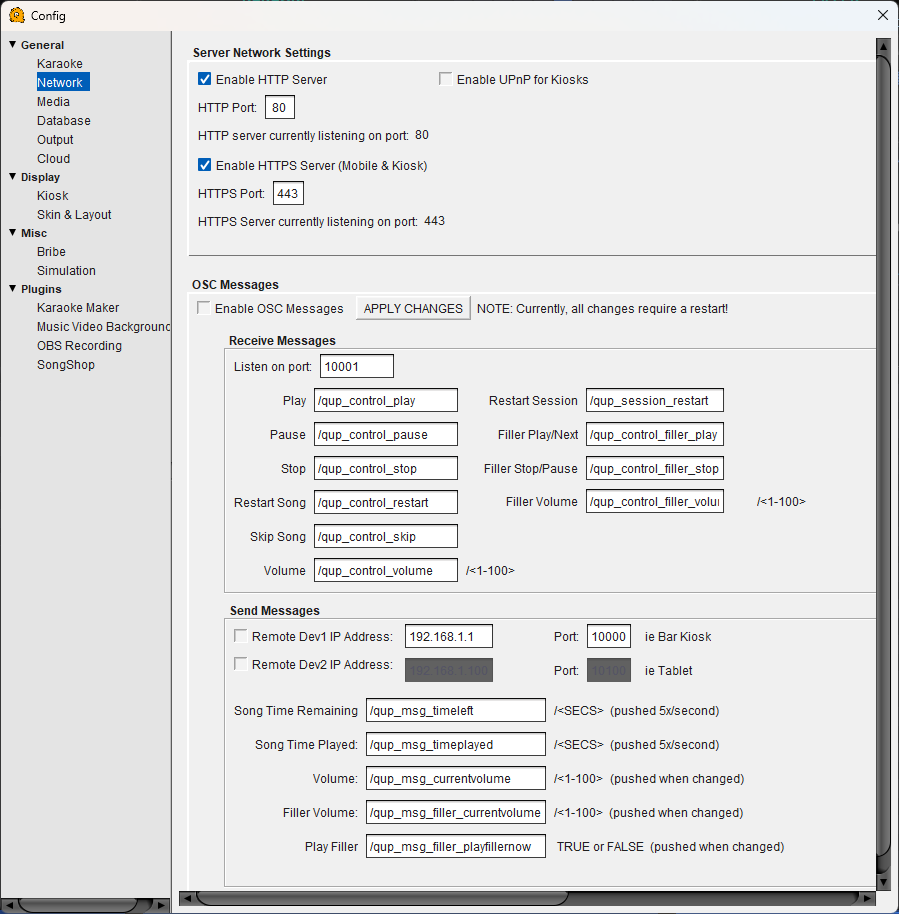
Network Configuration
Server Network Settings
Enable HTTP Server — Turns on QUP's built-in web server, which serves the kiosk interface to devices on your local network. Singers connect to this to browse and queue songs.
HTTP Port — The port the HTTP server listens on. Default is 80. If another application is already using port 80, change this to an unused port.
Enable UPnP for Kiosks — Automatically configures port forwarding on your router via UPnP so kiosk devices can find QUP without manual network setup.
Enable HTTPS Server (Mobile & Kiosk) — Enables a secure HTTPS connection for the kiosk and mobile queuing interface. Required for some mobile browser features like clipboard access and PWA installation.
HTTPS Port — The port the HTTPS server listens on. Default is 443.
OSC Messages
OSC (Open Sound Control) lets QUP communicate with external hardware and software over your network. This is useful for integrating with lighting controllers, touch panels, stream decks, or custom bar kiosk hardware. Changes to OSC settings require a restart.
Enable OSC Messages — Turns OSC messaging on or off.
Receive Messages
Listen on port — The port QUP listens on for incoming OSC commands. Default is 10001.
Each row maps an OSC address to a QUP action. When QUP receives a message at that address, it performs the corresponding action. The default mappings are:
Play — /qup_control_play
Pause — /qup_control_pause
Stop — /qup_control_stop
Restart Song — /qup_control_restart
Skip Song — /qup_control_skip
Volume — /qup_control_volume (value 1–100)
Restart Session — /qup_session_restart
Filler Play/Next — /qup_control_filler_play
Filler Stop/Pause — /qup_control_filler_stop
Filler Volume — /qup_control_filler_volume (value 1–100)
You can rename any of these addresses to match your existing OSC setup.
Send Messages
QUP can push real-time status information to external devices over OSC. Enable up to two remote devices by checking the box next to each and entering their IP address and port.
Remote Dev1 / Dev2 IP Address & Port — The network address of the device you want to send messages to (e.g. a bar kiosk display or a tablet).
The outgoing messages are:
Song Time Remaining — /qup_msg_timeleft (seconds, pushed 5x/second)
Song Time Played — /qup_msg_timeplayed (seconds, pushed 5x/second)
Volume — /qup_msg_currentvolume (1–100, pushed when changed)
Filler Volume — /qup_msg_filler_currentvolume (1–100, pushed when changed)
Play Filler — /qup_msg_filler_playfillernow (TRUE or FALSE, pushed when changed)