Settings-Music-Video-Backgrounds-Plugin
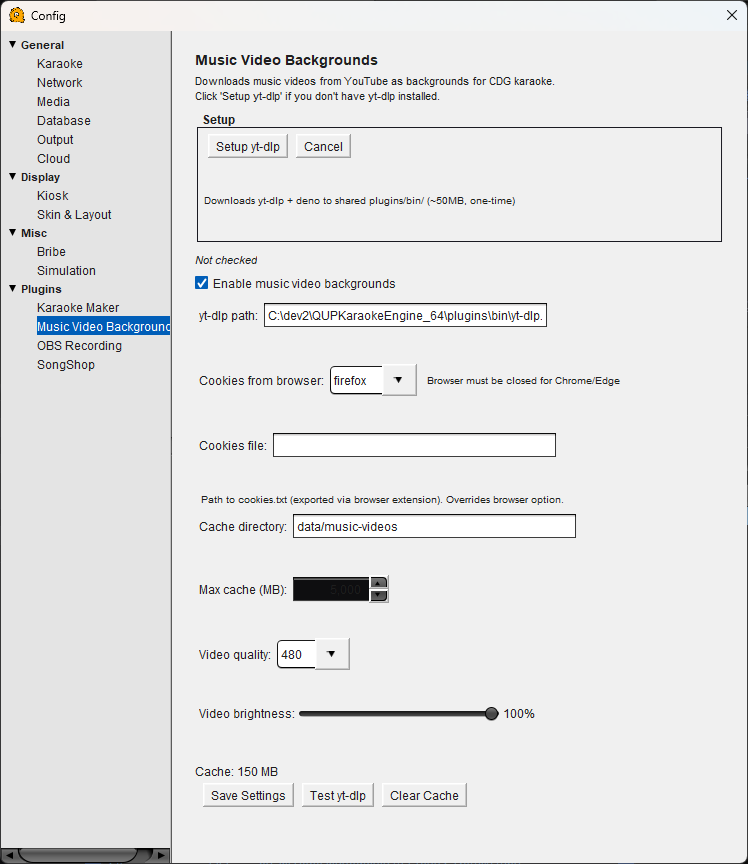 Disclaimer: Users will receive a popup asking if they agree that they have the rights to use the video on first use. Failure to agree keeps the plugin disabled
Music Video Backgrounds Configuration
Automatically downloads music videos from YouTube to play as backgrounds behind CDG karaoke lyrics. Instead of a plain black background, singers get the actual music video playing behind their words.
Setup
Setup yt-dlp — Downloads yt-dlp and deno to the shared plugins/bin/ folder (~50MB, one-time). Click this if you don't have yt-dlp installed yet.
Cancel — Cancels a setup in progress.
Enable music video backgrounds — Turns the feature on or off. When enabled, QUP automatically searches for and downloads a matching music video whenever a CDG track plays.
yt-dlp path — The path to the yt-dlp executable. This is set automatically by the setup process but can be changed if you have yt-dlp installed elsewhere.
YouTube Settings
Cookies from browser — Select which browser QUP should pull cookies from when downloading from YouTube. Helps with age-restricted or region-locked videos. Chrome and Edge must be fully closed before QUP can read their cookies.
Cookies file — Path to a cookies.txt file exported via a browser extension. Overrides the browser option above.
Cache
Cache directory — The folder where downloaded music videos are stored. Default is data/music-videos inside the QUP directory.
Max cache (MB) — The maximum disk space music video downloads can use. When the cache is full, the oldest videos are removed to make room for new ones.
Cache — Shows the current size of the music video cache on disk.
Video
Video quality — The resolution to download music videos at. Lower values (360, 480) save disk space and bandwidth; higher values (720, 1080) look better on large screens. 480 is a good default since the video plays behind CDG lyrics.
Video brightness — Controls how bright the background video appears behind the CDG lyrics. Lower brightness makes the lyrics easier to read. At 100% the video plays at full brightness.
Save Settings — Saves your music video background configuration.
Test yt-dlp — Runs a quick test to verify yt-dlp is installed and working correctly.
Clear Cache — Deletes all cached music videos and frees up disk space.