Settings-Kiosk
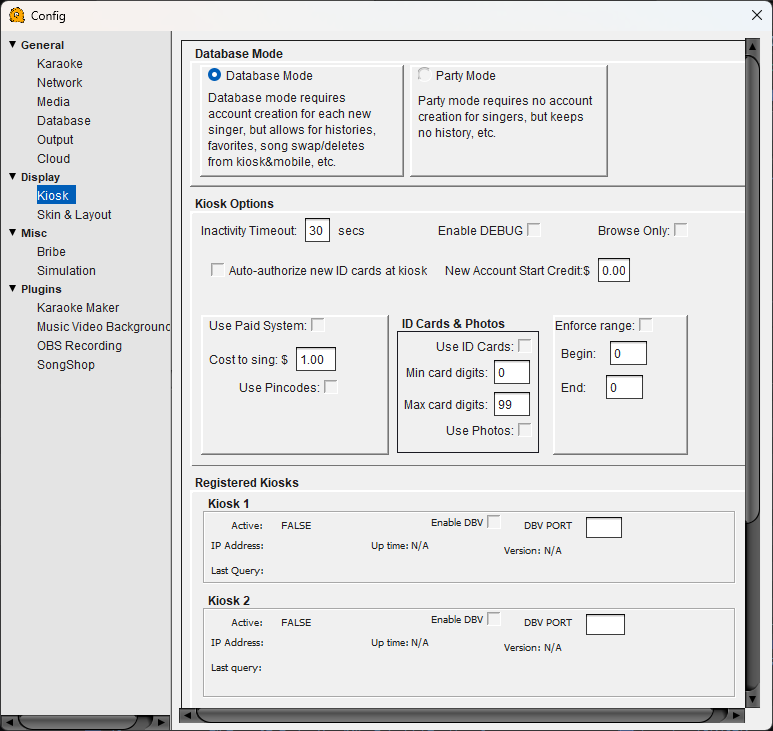
Kiosk Configuration
Database Mode
Database Mode — Requires account creation for each new singer. Singers create a profile the first time they visit the kiosk or mobile interface. This enables song history, favorites, song swapping/deleting from the kiosk and mobile, and other personalized features.
Party Mode — No account creation required. Singers can queue songs immediately without signing up. Simpler for casual events but does not track history or favorites.
Kiosk Options
Inactivity Timeout — How many seconds of inactivity before the kiosk returns to the welcome screen. Default is 30 seconds.
Enable DEBUG — Displays debug information on the kiosk interface. Used for troubleshooting kiosk connectivity or display issues.
Browse Only — When enabled, singers can search and browse the song library but cannot queue songs. Useful for display-only kiosks where queuing is handled by the host.
Auto-authorize new ID cards at kiosk — Automatically registers new ID cards the first time they are scanned, without requiring host approval.
New Account Start Credit — The dollar amount credited to new singer accounts when they first sign up. Set to 0.00 to disable starting credits.
Use Paid System — Enables pay-per-song mode. Singers must have credit in their account to queue a song.
Cost to sing — The dollar amount charged per song when the paid system is enabled.
Use Pincodes — Requires singers to enter a personal pin code to access their account on the kiosk. Prevents other people from queuing under someone else's name.
ID Cards & Photos
Use ID Cards — Enables ID card scanning at the kiosk for singer identification. Singers tap or scan a card instead of typing their name.
Min card digits / Max card digits — The minimum and maximum number of digits QUP will accept as a valid card ID. Use these to filter out accidental reads or incompatible cards.
Use Photos — Allows singers to set a profile photo. Photos are displayed on the projected playlist and kiosk.
Enforce Range
Enforce range — When enabled, only card IDs within the specified Begin and End range are accepted. Useful if your venue issues its own numbered cards and you want to reject any cards outside your set.
Begin / End — The lowest and highest card ID numbers to accept.
Registered Kiosks
Shows the status of up to two dedicated kiosk devices. Each kiosk displays:
Active — Whether the kiosk is currently connected to QUP.
Enable DBV — Enables a dollar bill validator connected to the kiosk, allowing singers to add credit by inserting cash.
DBV PORT — The serial port the bill validator is connected to.
IP Address — The network address of the kiosk device.
Up time — How long the kiosk has been connected.
Version — The software version running on the kiosk.
Last Query — The last time the kiosk communicated with QUP.