Settings-Karaoke
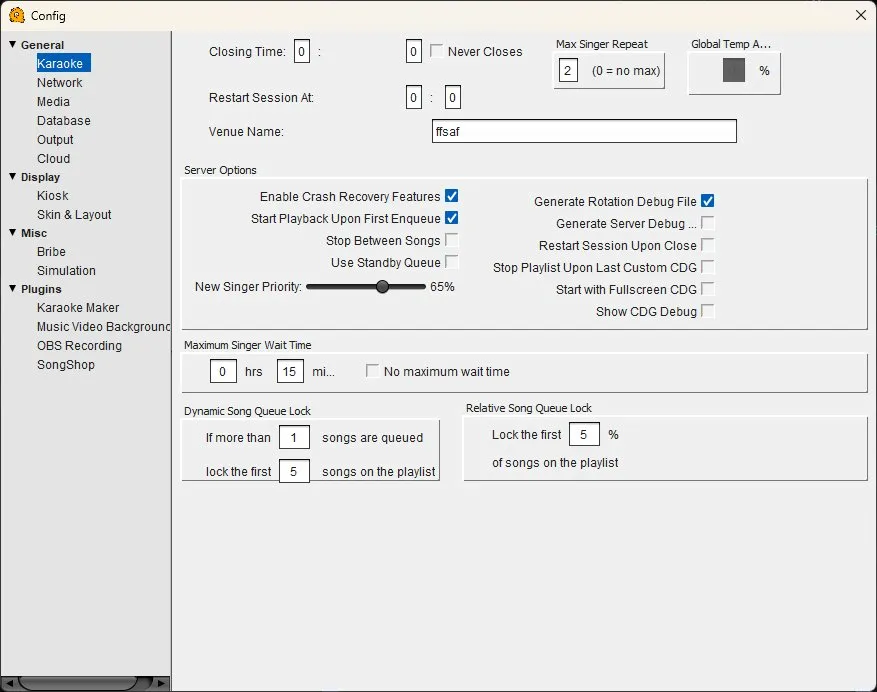
Karaoke Configuration
Closing Time — Set the time your show ends (24-hour format). When the closing time is reached, QUP stops accepting new song requests. Check "Never Closes" to run an open-ended session.
Restart Session At — Set a time (24-hour format) for the session to automatically restart. Useful for venues that run daily shows and want a fresh rotation each day.
Venue Name — The name of your venue. This is displayed on the kiosk and projected playlist so singers know where they are.
Max Singer Repeat — How many times a singer can appear in the rotation before they must wait for others to sing. Set to 0 for no limit.
Global Tempo Adjust — Apply a global tempo shift (as a percentage) to all songs. Useful if your crowd prefers things slightly faster or slower.
Server Options
Enable Crash Recovery Features — Saves session state periodically so the rotation, queue, and singer list can be restored if QUP closes unexpectedly.
Start Playback Upon First Enqueue — Automatically starts playing the first song as soon as someone queues one, rather than requiring the host to press play.
Stop Between Songs — Pauses playback between each song, requiring the host to manually start the next track.
Use Standby Queue — Enables a secondary queue for holding songs that aren't yet part of the active rotation.
New Singer Priority — A slider (0–100%) that controls how much priority new singers get in the rotation. Higher values push first-time singers closer to the front. At 0% new singers are treated the same as everyone else.
Generate Rotation Debug File — Writes a debug log of rotation decisions. Helpful for troubleshooting rotation order issues.
Generate Server Debug — Writes detailed server-side debug logs.
Restart Session Upon Close — Automatically resets the session (clears rotation and queue) when QUP is closed.
Stop Playlist Upon Last Custom CDG — Stops playback after the last CDG+MP3 track finishes, rather than continuing with filler music.
Start with Fullscreen CDG — Launches the CDG display window in fullscreen mode on startup.
Show CDG Debug — Displays CDG rendering debug information overlaid on the CDG window.
Maximum Singer Wait Time
The longest a singer should have to wait before their turn. Set hours and minutes, or check "No maximum wait time" to disable the limit. When enabled, the rotation engine will bump singers who have been waiting too long.
Dynamic Song Queue Lock
Prevents singers from rearranging or removing songs near the top of the playlist. Example: "If more than 1 songs are queued, lock the first 5 songs." This stops last-minute shuffling that disrupts the flow of your show.
Relative Song Queue Lock
Similar to the dynamic lock but expressed as a percentage. Example: "Lock the first 5% of songs on the playlist." Scales automatically with playlist size — useful for larger shows.