Settings-Cloud
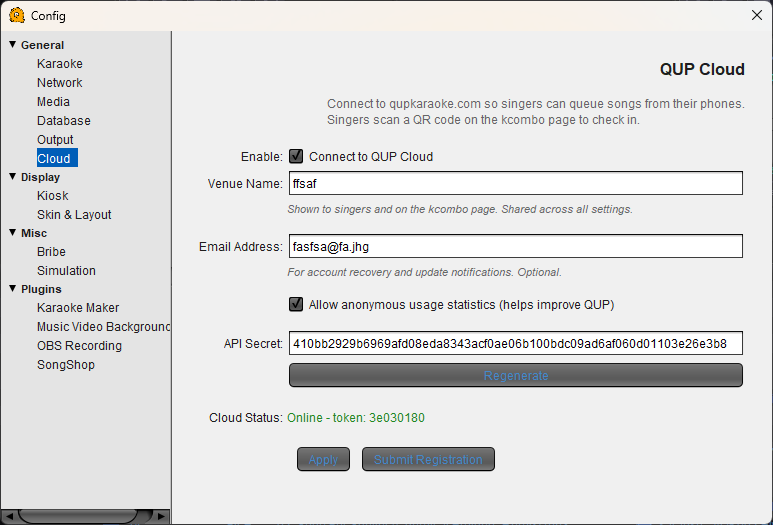
Cloud Configuration
QUP Cloud connects your system to qupkaraoke.com so singers can queue songs directly from their phones. Singers scan a QR code displayed on the kcombo page to check in and start browsing your song library.
Enable: Connect to QUP Cloud — Turns the cloud queuing system on or off. When enabled, QUP maintains a live connection to qupkaraoke.com and accepts remote song requests from singers.
Venue Name — Your venue's name as shown to singers on the kcombo page and in the mobile queuing interface. This is shared across all settings — changing it here updates it everywhere.
Email Address — Optional. Used for account recovery and update notifications.
Allow anonymous usage statistics — When checked, QUP sends anonymous usage data to help improve the software. No personal or singer information is shared.
API Secret — A unique token that authenticates your QUP instance with the cloud server. This is generated automatically. Do not share this key with anyone.
Regenerate — Creates a new API secret. Use this if you believe your key has been compromised. After regenerating, your existing cloud session will be reset.
Cloud Status — Shows whether your system is currently connected to QUP Cloud, along with your session token. "Online" means singers can actively queue from their phones.
Apply — Saves your cloud settings and connects (or reconnects) to the cloud server.
Submit Registration — Registers your system with the QUP Cloud service for the first time.