Quick-Start Guide
This guide gets you from first launch to your first singer in under five minutes.
Install QUP
QUP ships with everything it needs, including its own Java runtime — you do not need to install Java. Download the build for your system from the Download page:
- Windows — run the
-windows-setup.exeinstaller. It installs for the current user, so it doesn't need administrator rights. The installer and the app are code-signed. - macOS — open the
.dmgand drag QUP into your Applications folder. The app is notarized by Apple, so it opens normally the first time. - Linux — on Debian or Ubuntu, install the
.deb:sudo apt install ./QUPKaraokeEngine-<version>-linux-amd64.deb. On any other distribution use the AppImage — mark it executable withchmod +xand run it.
The one exception is the Linux portable zip, a bring-your-own-Java build for systems the other packages don't suit. It needs Java 25 on your PATH (for example sudo apt install openjdk-25-jre) and starts with ./run.sh.
Launch QUP and you'll land on the main window.
Step 1: Add Your Karaoke Media
Before you can host a show, QUP needs to know where your karaoke files are stored.
- Click the Config icon (gear) in the top right corner of the main window.
- Select Media from the left panel.
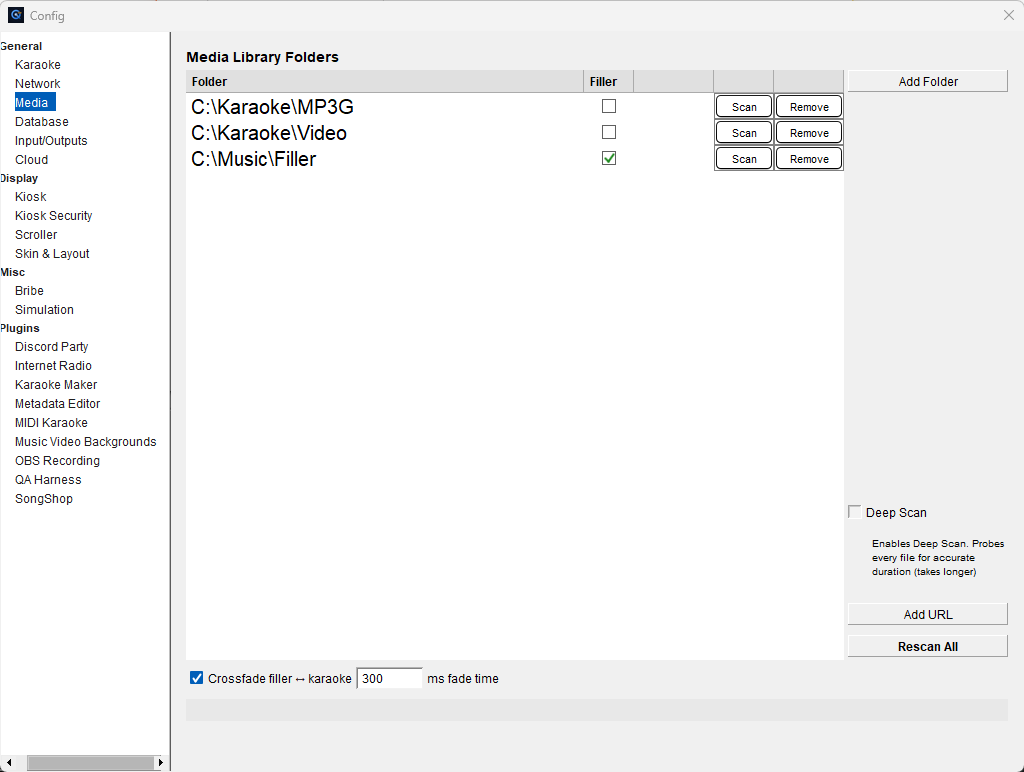
- Click Add Folder and browse to the folder on your computer where your karaoke files are stored (MP3+CDG, MP4, MKV, or ZIP).
- Click Scan next to the folder to build the song database.
- If you have background music for between singers, add that folder too and check the Filler checkbox next to it.
- Close the Config panel.
Your songs will now appear in the Karaoke tab of the Song Browser on the right side of the main window. The total song count is shown in the bottom right corner.
Step 2: Queue a Song for a Singer
There are two ways to get a song into the queue — double-click it, or drag it onto the Playlist.
Double-click (full options)
- Find a song in the Song Browser using the search bar.
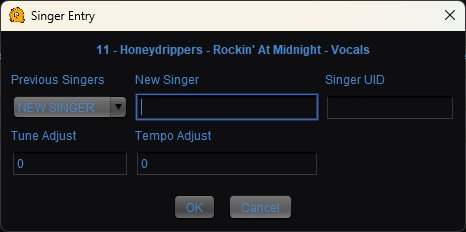
- Double-click the song to open the Singer Entry dialog.
- Type the singer's name in the New Singer field, or select an existing singer from the Previous Singers dropdown.
- Optionally adjust Tune (pitch) or Tempo if needed.
- Click OK.
The singer is added to the Rotation and their song appears in the Playlist.
Drag onto the Playlist
You can also drag a song out of the Song Browser and drop it on the Playlist. Where you drop it decides what happens:
- Drop it on an empty part of the Playlist to queue it. QUP asks who is singing and lets you set tune and tempo before it's added, the same as a double-click.
- Drop it straight onto a song already in the queue to swap that entry's song for the one you dragged. The singer keeps their turn in the rotation — only the song changes. This is the quick way to handle "actually, can I sing something else?" without re-queuing anyone. Songs that have already played can't be swapped this way.
Step 3: Start the Show
If Start Playback Upon First Enqueue is enabled in the Karaoke config (it is by default), the first song starts playing automatically as soon as it's queued. Otherwise, click the Play button in the transport controls.
That's it — you're hosting karaoke. For detailed information on every feature, see the full Documentation.
Want to run DJ sets instead — two decks, beatgrids, SYNC, scratch, Auto DJ? See DJ Mode for how to switch QUP into its second face.