Main-Rotation
Rotation
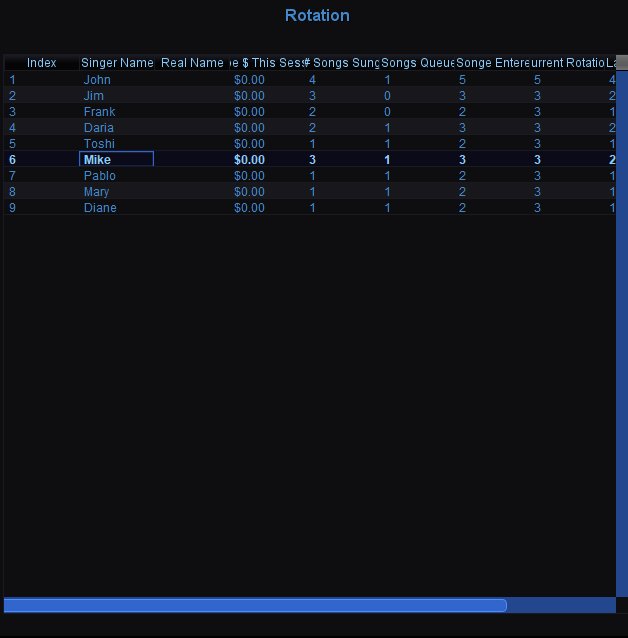 The Rotation table shows every singer in the current session and their stats. The rotation engine determines the order singers appear — it balances fairness based on wait time, new singer priority, and how many songs each person has sung.
Rotation Columns
Index — The singer's current position in the rotation order.
Singer Name — The singer's display name as entered at the kiosk or by the host.
Real Name — The singer's real name, if different from their display name.
$ — The singer's account balance. Used when the paid system is enabled.
This Sess — How many songs this singer has sung during the current session.
# Songs Sung — Total number of songs the singer has sung across all sessions.
Songs Queued — How many songs the singer currently has waiting in the playlist.
Songs Entered — Total number of songs the singer has queued this session, including songs already sung.
Current Rotation — The rotation round the singer is currently in. Higher numbers mean they have been through the rotation more times.
Last — The last rotation round in which the singer sang.
Right-Click Context Menu
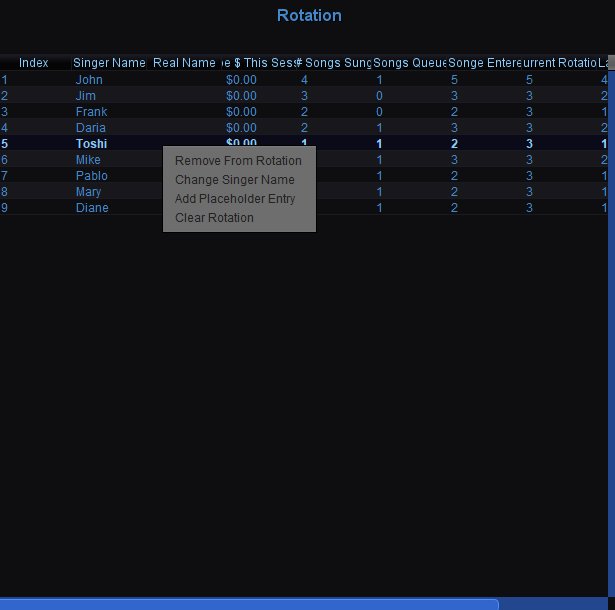 Right-click any singer in the rotation for management options:
Remove From Rotation — Removes the singer and all their queued songs from the session. Use this when someone leaves for the night.
Change Singer Name — Opens a dialog to rename the singer. Useful for fixing typos or when a singer wants to change their display name mid-session.
Add Placeholder Entry — Adds a placeholder singer to the rotation. Useful for reserving a spot — for example, if someone is on their way to the venue and wants a place held.
Clear Rotation — Removes all singers and their songs from the rotation, resetting the session completely. Use with caution — this cannot be undone.